Is Movavi Free to Use? Here’s Everything You Need to Know
07/15/2023 22:00
Is Movavi free to use? Discover the limitations of the free version and explore the benefits of upgrading to a paid version in this guide.
In the realm of multimedia editing, one name that often comes up is Movavi. This sophisticated software suite is designed to manage multimedia files, but how much does it cost, and is it possible to use Movavi for free?
This comprehensive guide will answer all your questions about Movavi, its features, pricing, and whether a free version exists.
Introducing Movavi: A multimedia software
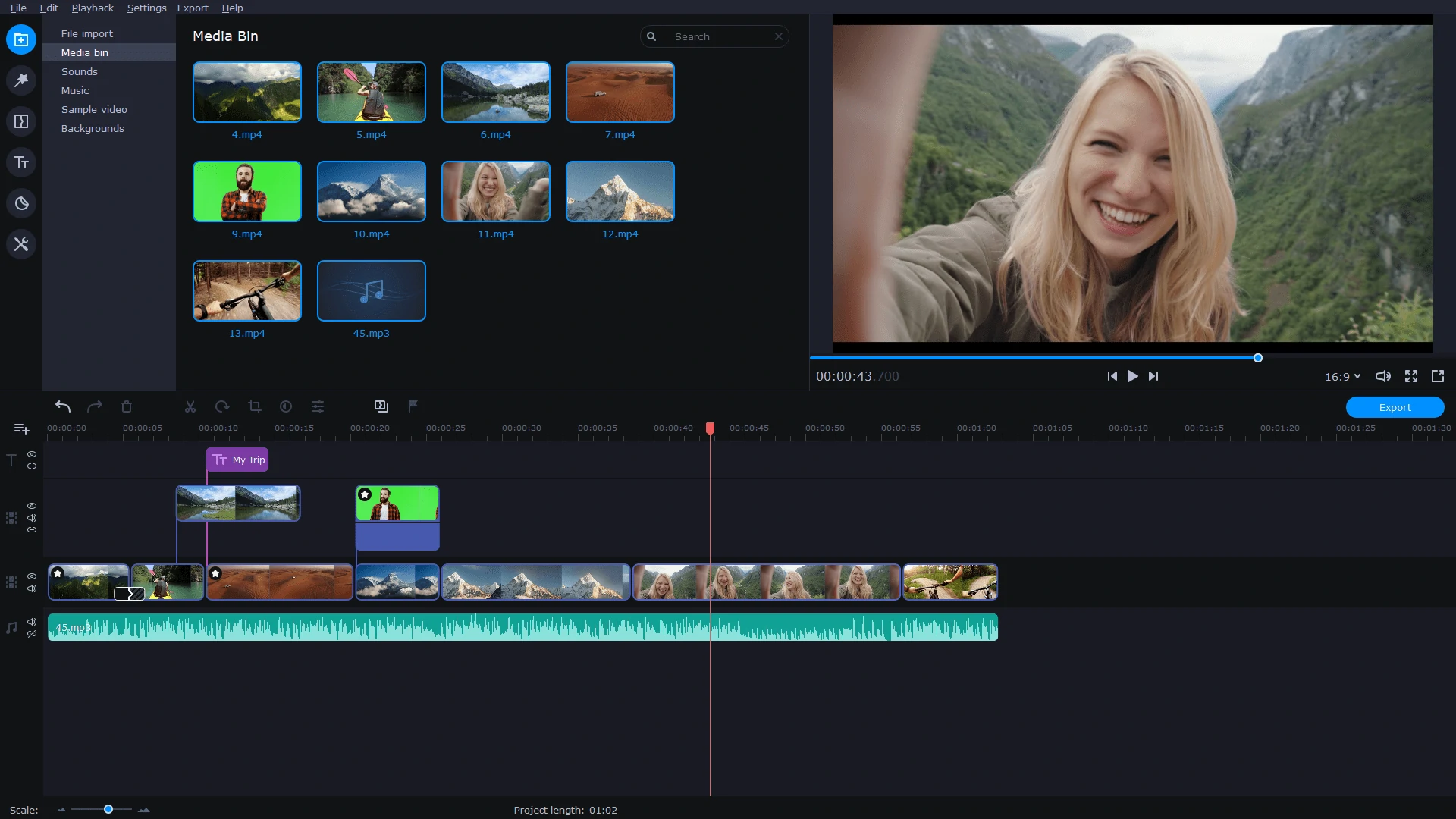
Introducing Movavi
Movavi is a renowned multimedia software suite designed to handle various tasks involving video and photo editing. From basic video format conversion to advanced editing and enhancement, Movavi offers an array of functionalities to cater to different users’ needs. It is compatible with both Windows and Mac operating systems and continues to be updated by the developers to ensure smooth operation across various machines and devices.
Is Movavi a free tool?
Movavi is a multimedia software that offers both free and paid versions of its products. While Movavi provides a range of free tools and features, it also offers premium versions with additional functionalities.
The availability of free features depends on the specific Movavi software you are using. Generally, the free version of Movavi comes with limitations, such as watermarked output, restricted features, or limited usage time. To unlock the full capabilities of Movavi and access advanced features, you may need to upgrade to a paid version.
It is important to check the specific terms and conditions of each Movavi product to determine the extent of its free offering and the benefits of the premium version.
Movavi Video Editor Plus: An overview
Movavi Video Editor Plus is a powerful tool that not only allows users to change the format of multimedia files but also provides editing capabilities. With this software, users can quickly convert video files into different formats without compromising the quality, saving time and effort.
Key features of Movavi Video Editor Plus
This AI tool offers an extensive range of features that makes it stand out from other video editing software:
- Ease of use: The software is user-friendly, allowing even beginners to navigate its functionalities with ease. The process is straightforward: upload the files, choose the format, and start the conversion.
- Multi-format support: Movavi Video Editor Plus supports all popular video formats, allowing users to convert videos without worrying about format compatibility issues.
- Video editing capabilities: Apart from video conversion, the software also includes basic video editing features. Users can perform tasks like video stabilization, audio manipulation, cropping, and more right inside the program.
- Trial period: Movavi Video Editor Plus offers a 7-day trial period, allowing users to test out the software before deciding to purchase the full version.
- Tutorial availability: The software comes with an in-house tutorial, making it easier for new users to understand its functionalities.
Movavi Video Editor Plus pricing
Movavi Video Editor Plus isn’t free, but it does provide a trial version that allows users to explore its features before making a purchase. After the trial period, users can opt for a subscription costing $54.95 per year. Alternatively, they can make a one-time payment of $79.95 to acquire the software.
For those looking for more features, the Movavi Video Suite, which includes a format converter, disc burner, and screen recording app, is available for $94.95 per year. There’s also the Movavi Unlimited plan, which costs $129.95 per year. Users can opt for a one-time payment of $259.95, offering additional photo and PDF editing features.
Explore Gling AI, an amazing video editing software! Peek into its immense capabilities and discover its alternatives.
Exploring Movavi’s pricing plans
Limitations of the free Movavi Video Editor Plus
While Movavi Video Editor Plus offers a free trial version, it comes with certain limitations:
- Limited duration: The free trial only lasts for seven days, after which users will need to purchase a subscription to continue using the software.
- Watermarked videos: Videos created using the trial version of Movavi Video Editor Plus will have a watermark, which can only be removed in the paid version.
- Half-length audio: When saving a file using the trial version, only half-length audio is available.
Ignite your creativity, push boundaries, and create breathtaking masterpieces like never before. Explore the AI art tools that will redefine your artistic journey!
Free Movavi alternatives
If you’re looking for free alternatives to Movavi, there are several options available. Some of the most popular ones include DaVinci Resolve, Lightworks, GIMP, Paint.Net, and Pixlr. These tools offer various video editing features and are great for users who don’t want to invest in paid software yet.
1. DaVinci Resolve
DaVinci Resolve is a professional-grade video editing software that offers color correction tools, making it a perfect choice for those looking to enhance the aesthetic appeal of their videos. It also supports 3D videos and is compatible with Linux, making it a versatile option for various users.
2. Lightworks
Lightworks is another powerful video editing software that supports all popular video formats. It offers batch video editing and provides a wide range of tools for effective video editing.
3. GIMP
GIMP is a raster graphics editor with open-source code, making it a great choice for users who want the ability to manually customize various tools. It offers a wide range of tools for image editing and color correction.
4. Paint.Net
Paint.Net is a suitable option for basic image editing and color correction. It offers various painting tools and is easy to use, making it a good choice for beginners.
5. Pixlr
Pixlr is a web-based photo editing tool that offers an array of features for enhancing images. It provides various filters and effects, text overlay options, and supports HD resolution.

Leveraging Movavi to create amazing content
Conclusion
While Movavi is not free, it offers a trial version that allows users to explore its features before making a purchase. Its powerful video editing capabilities make it a valuable tool for anyone looking to enhance their multimedia files.
However, if you’re looking for free alternatives, there are several options available, including DaVinci Resolve, Lightworks, GIMP, Paint.Net, and Pixlr. Each of these tools offers unique features and capabilities, allowing users to choose the one that best fits their needs.